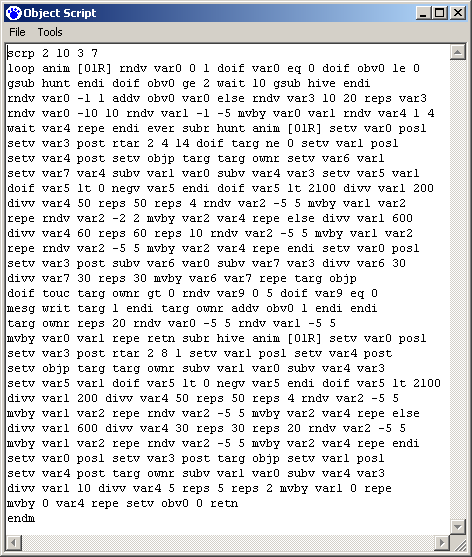
I do love that I can open C3/DS cos scripts and get the initial injection code, rather than having to backwards engineer it as in C1 and C2. Given how complicated many of the objects in C3/DS are, this sort of modification may well have been impossible without this small change in code accessibility! Here's the initial shark script - with a lot of unnecessary empty lines removed. Actually, this whole script seems to contain a lot of unnecessary stuff, such as a reps loop that runs once, or object variables that are set but never referenced. It feels very much like code that was never cleaned up after they got it functional.
Search This Blog
Amazing Technicolor Sharks
Grand Botanical Overhaul I: Cacti
I've recently begun my most ambitious project yet: the Grand Botanical Overhaul for Creatures 2. The plan here is to do something similar to my Creatures 1 Herb Update, to improve consistency in plant behaviors and streamline their use for creatures, while also including some quality of life improvements for the player. This includes:
- Including launchers for the plants that don't have them
- Making sure the main plants (pear, triffid, trumpet, aubergine, tomato, and acorn) have proper life cycles including plants, fruits, seeds, and detritus. This includes fixing any bugs in their life cycle.
- Ensuring that anything inedible is invisible - both plants that are naturally inedible and plants that simply aren't ready to eat yet.
- Implementing behavior similar to my updated C1 Herbs: creatures eat directly off the plant, hand pushes plant to pluck the fruit.
- Reclassifying harmful members of edible classes into badplants.
As I go through this process, I'm thoroughly analyzing the code for each plant, so this will be a series of in-depth looks at the CAOS involved. I will be going into the changes I've made, but won't put anything up for download until the project is finished. I'm beginning with the cacti - technically badplants, but still in need of some fixes.
I'm a One-Woman QA Department
Things have been slow working from home lately and I finally decided I was utterly fed up with... well, pretty much everything that's wrong with Creatures 2. So with the help of Bella the Beta Norn, I set out to fix as much of it as possible, which turned out to actually be quite a lot.
You're gonna need a bigger better boat.
I began with my archnemesis: the boats. I've previously expressed my gripes with the boats, especially the light ocean one:
"Not only do creatures constantly get stuck in it, not only are the controls located where you can't click on them when the boat is occupied, but the boat itself is completely pointless because it leads to a small, dead end patch of island with no food on it."
I initially "solved" this problem by just deleting the boat, but did not release a COB for it because the hard part would be re-creating the boat. I started work on that, and then I figured, the dark ocean boat isn't so bad but it's still an annoyance, so I should go ahead and fix that too. So at that point, why settle for just deleting the light ocean boat? If I'm replacing the dark ocean boat, I might as well replace the other one too.The scriptorium makes the event scripts for any official object trivial to obtain, but with COBs like this, the hard part is always in restoring the original object as part of the COB removal script - while event scripts are easy to rip from the game, the injection/creation script is generally a mystery, and that's where a lot of important values are set: initial values for object variables, attr and bhvr values, and various physics traits. With complex objects like the boats, you need to create the parts in the correct order, too.
The End is Nigh
Though I spent this session just playing with Norns, believe you me, I am definitely putting together a to-do list, because there is a lot wrong with this game. Speaking as a professional game performance tester: Creatures 2 should never have released in the state it was in. Even with all the haphazard patches released after launch, it's still buggy as all get out, and should have remained in development for another year or two. But it didn't, so for now I just have to deal.
One of the biggest issues, and the one that might be beyond my ability to fix on my own, is that the creatures are constantly tired. I haven't yet confirmed my theory that most of the food items are busted and that's the cause of their issues with eating, but the sleep problem is almost certainly a genome issue. This didn't stop them from producing seven hatchlings, though! I'll split the genetic analysis into a separate post.Topsy Turvy Toxic World
So, last session I said that "while I like Toxic Norns well enough, it's a huge hassle to keep and interbreed them with other Norns" and that got me thinking. I'm not going to attempt keeping Toxics in the main world, but I realized I could easily have a separate world for them. So I created the Mire, dropped the Ettin and Grendel eggs into the water, and started spreading nastiness around the whole world.
Of course, a world full of one breed of plain Norns wouldn't be that much fun, and I was curious about how colortrue creatures worked, so I cracked open a genome and whipped up a colortrue Toxic Norn. I'm sure there are better varieties out there currently that can interbreed with other colortrues (at least as well as any Toxic could interbreed), so I'm not going to put this variety up for download, but it was interesting to see how simple the edits really are. The pigment genes are just moved around so they fall under different organs, their mutations are turned off, and they're unlinked from age/gender. There are four of each color channel, and the base creature of any color has all four of a given channel set to the same value.
I'm not a big fan of the overlay look of high pigment values, so I stayed in the middle as I created six Norns: three male, three female. The males each have one color channel that is higher (set to 192 instead of 128), and the females each have one color channel that is lower (set to 64 instead of 128). And of course, I created a new name generator catalogue for this world too! From left to right, these are Foulvenom (magenta), Acidfilth (yellow), Witchphlegm (green), Rotgut (blue), Ruinbile (red), and Slimestump (cyan). I definitely prefer the look of the females with the lowered channels, so hopefully we'll see colors leaning toward the middle over time.
Bees, Beelacanths, and Flies, Oh My!
Having finished my improved version of the bees and hives update, as well as my improved beelacanth, I'd like to go into detail about the changes I've made to the code, which means lots of rainbow-highlighted CAOS scripts. If anybody reading this post happens to be colorblind, I apologize in advance. To the anonymous commenter who wanted more CAOS code: you're welcome.
Bee nightmare script, annotated
[Originally written July 12 2021]
I started by examining the
official beehive upgrade script. It includes scripts for both bees and hive. I
started first with the hive, and found that most of the scripts are fairly
simple. The push script looks complex and frightening at first, but on closer
inspection they’ve just crammed multiple statements into the same line. Split
up for readability and annotated, the script is long but not so frightening.
The biggest problem here is that this is the push script, which should feed the creatures in accordance with similar vendors, but instead it dispenses bees. I suspect this is so that you get bees upon clicking the hive, so when I swap the scripts, I’ll either have to disable that feature or find a way to conditionally react differently to the hand.
Then I moved on to the bees themselves. Whoever wrote this monstrosity should be keelhauled.
Thanks, I hate it! I went through and added linebreaks and indentation for readability, then annotated the whole thing. You're welcome.
| scrp 2 10 3 7 loop anim [01R] rndv var0 0 1 doif var0 eq 0 doif obv0 le 0 gsub hunt endi doif obv0 ge 2 wait 10 gsub hive endi rndv var0 -1 1 addv obv0 var0 else rndv var3 10 20 reps var3 rndv var0 -10 10 rndv var1 -1 -5 mvby var0 var1 rndv var4 1 4 wait var4 repe endi ever subr hunt anim [01R] setv var0 posl setv var3 post rtar 2 4 14 doif targ ne 0 setv var1 posl setv var4 post setv objp targ targ ownr setv var6 var1 setv var7 var4 subv var1 var0 subv var4 var3 setv var5 var1 doif var5 lt 0 negv var5 endi doif var5 lt 2100 divv var1 200 divv var4 50 reps 50 reps 4 rndv var2 -5 5 mvby var1 var2 repe rndv var2 -2 2 mvby var2 var4 repe else divv var1 600 divv var4 60 reps 60 reps 10 rndv var2 -5 5 mvby var1 var2 repe rndv var2 -5 5 mvby var2 var4 repe endi setv var0 posl setv var3 post subv var6 var0 subv var7 var3 divv var6 30 divv var7 30 reps 30 mvby var6 var7 repe targ objp doif touc targ ownr gt 0 rndv var9 0 5 doif var9 eq 0 mesg writ targ 1 endi targ ownr addv obv0 1 endi endi targ ownr reps 20 rndv var0 -5 5 rndv var1 -5 5 mvby var0 var1 repe retn subr hive anim [01R] setv var0 posl setv var3 post rtar 2 8 1 setv var1 posl setv var4 post setv objp targ targ ownr subv var1 var0 subv var4 var3 setv var5 var1 doif var5 lt 0 negv var5 endi doif var5 lt 2100 divv var1 200 divv var4 50 reps 50 reps 4 rndv var2 -5 5 mvby var1 var2 repe rndv var2 -5 5 mvby var2 var4 repe else divv var1 600 divv var4 30 reps 30 reps 20 rndv var2 -5 5 mvby var1 var2 repe rndv var2 -5 5 mvby var2 var4 repe endi setv var0 posl setv var3 post targ objp setv var1 posl setv var4 post targ ownr subv var1 var0 subv var4 var3 divv var1 10 divv var4 5 reps 5 reps 2 mvby var1 0 repe mvby 0 var4 repe setv obv0 0 retn endm | ENTER SCOPE SCRIPT Endless loop {Flap wings animation Pick random choice of 0 or 1 If choice is 0 {if obv0 is 0 or less (obv0 = fullness) {run the hunt subroutine } if obv0 is 2 or more {wait for 10 run the hive subroutine } Pick random value adjust obv0 accordingly }else (if choice is 1) {pick random number of repetitions For that many times... {pick random vertical value pick random horizontal value move by that amount pick random amount of time wait that amount. } } } HUNTING SUBROUTINE (when bee is hungry) flap wings animation record x position record y position target random beelacanth if target exists {record x position of plant record y position of plant set object pointer to point to this plant target bee again save plant x position save plant y position find x distance to plant find y distance to plant record soon-to-be-absolute x dist to plant if it's less than 0 {negate it to make it positive } If absolute distance is less than 2100 {divide x distance by 200 divide y distance by 50 for 50 repetitions {for 4 repetitions {pick random value between -5 and 5 move toward plant in x, random y } pick random value between -2 and 2 move toward plant in y, random x } }else (absolute distance is more than 2100) {divide x distance by 600 divide y distance by 60 for 60 repetitions {for 10 repetitions {pick random value between -5 and 5 move toward plant in x, random y } pick random value between -5 and 5 move toward plant in y, random x } } record new x position record new y position find new x distance to plant find new y distance to plant divide x distance by 30 divide y distance by 30 for 30 repetitions {move toward plant } Target beelacanth If the beelacanth touches the bee {pick random value between 0 and 5 if that value is 0 {beelacanth pull script } target bee again add 1 to obv0 } } target bee for 20 repetitions {pick random value pick random value move by random values } end subroutine HIVE SUBROUTINE (when bee is full) flap wings animation record x position record y position pick random beehive record beehive x position record beehive y position set pointer to beehive target bee again find x distance to beehive find y distance to beehive save soon-to-be-absolute x distance if it's negative {negate it to make it positive } if absolute x distance is less than 2100 {divide x distance by 200 divide y distance by 50 for 50 repetitions {for 4 repetitions {pick random value move toward beehive in x, random y } pick random value move toward beehive in y, random x } }else (distance is more than 2100) {divide x distance by 600 divide y distance by 30 for 30 repetitions {for 20 repetitions {random value move toward hive in x, random y } random value move toward hive in y, random x } } find new x position find new y position target hive get hive x position get hive y position target bee again find new x distance find new y distance divide x distance by 10 divide y distance by 5 for 5 repetitions {for 2 repetitions {move toward hive in x, no y change } move toward hive in y, no x change } set obv0 to 0, bee is no longer full end subroutine end script |
Not long after I had a new version of the bee and hive upgrade: one where the bees are a new type of object, and where the hive behaves similarly to other vendors (getting the hand to get different results than creatures was just a matter of a simple doif from eq pntr statement in the push script, where I triggered the pull script instead). Also, I made two versions; normally the bees at the hive have eyes but the ones that roam do not, and I made a version where they all have eyes.
Of course, the updated hive and beelacanth go hand in hand, so next on my to-do list is updating the unruly beelacanth, and I won't be releasing the beehive update until that's done!
COBbling rampage
[Originally written September 6 2020]
Emboldened by my success with the lemons, I’ve expanded my to-do list:
- Fix the coconuts. Playing with the shells shouldn’t cause pain, and I’ve noticed that creatures don’t seem to be able to eat the pieces.
- Fix the medicinal herbs. They don’t seem to go invisible when used up, thus causing the same kind of confusion about pushing not always working as the standard food. Also, I find it incredibly annoying that I’m not able to simply pick sprigs and carry them where I need them. That was the one thing the Playstation game did right!
- Fix the beelacanth. First of all, the plant contains small amounts of glycotoxin. In a herb. What were the developers thinking?! Secondly, the seed has unpredictable effects. Third, I want to bring its behavior into line with the updated medicinal herbs.
- Make a cheese vendor. Both to give me a source of cheese and to put my COBbling skills to the test.
But eventually world-breaking bugs gave way to oddly-placed objects, and once these were ironed out (turned out I’d forgotten to reset the target of the script to the owner after changing it and was pulling coordinates from the hand instead of the plants), I had a functional herb update pack! The herbs now become invisible when they’ve lost their usable sprig, so creatures aren’t tempted to keep pushing them. As an added bonus, clicking on the herb will pull the sprig off and drop it on the ground nearby – essentially, I’ve made the herbs double as vendors for their sprigs.
My plan initially was to take on the beelacanth next. The beelacanth is considerably more complicated than the standard herbs, and behaves quite differently. I’ve got a pretty good grasp on most of its behavior from annotating its code, and after some observation and testing courtesy of Bob (who had some nasty run-ins with the bees), I’ve concluded that it is perhaps too complex. I don’t mean for my level of skill (although that seems to be true right now too), I mean it’s confusing for the creatures.For instance, pushing a herb eats the sprig directly (and with my updates, hides the plant). With the beelacanth, pushing it eats the whole plant, except when there’s a fruit. In that case, the fruit pops off and the creature is left confused as to why he couldn’t eat the plant. There also appears to be a case for creatures pollinating plants by pulling them – but no other herb has a pull script. And there also seems to be code that can make the plant jettison its own seeds, based on a counter… but for one thing, the interaction of this counter with the timer means that if my calculations are correct, it would take several hours for this code to fire, and the counter doesn’t get reset! Similarly, the seeds can “go bad” after a while and cause different effects, but the creatures can’t distinguish a good seed from a bad one.
It’s all very impressive in theory and I don’t downplay its importance in paving the way for complex ecosystems in later games, but it just does not work well in the context of Creatures 1.
But I was having some issues updating the beelacanth, so I decided to move on to the coconut. I have searched on the internet for a fix for this, or even an explanation, and I can find nothing – but I have never seen a creature successfully eat a coconut. After looking through the code, I found, and fixed, the issue… and it turned out to be a oneliner. This is the “pick it up” script for the coconut piece, and the second line marks it as active. The problem? “Active” means creatures can’t use it again (which includes pushing it) until it goes inactive. I removed this line, and also changed a couple lines so that pushing the whole coconut slightly relieves boredom (in line with other toys, which the coconut is classified as) and no longer causes pain, and soon Betty was happily knocking down, cracking open, and eating coconuts.The beelacanth isn’t that important to me right now, since it’s an optional item that I don’t usually include in my worlds. What is important to me is cheese! I feel confident making my own COB from scratch now, even if just a simple, immobile vendor – a cheese plate that sits in the kitchen. If pushed by the hand, it would generate a piece of cheese. It would be tempting to do the same when pushed by a creature, but I want to be consistent with other vendors, of which there are officially four:
- Beehives – feeds honey directly when pushed (or is it pulled? If the latter, I will have to fix it…).
- Carrot vendor – feeds carrot directly when pushed.
- Hootch still – doesn’t do anything when pushed by anyone, and should probably be made invisible.
- Shee Seed Launcher – the odd one out, as it has a function but it doesn’t feed directly (I’ll have to fix this when I get around to finishing the beelacanth edits).
Therefore, the cheese plate should also feed directly. Besides, it’s easier to teach a creature that vendors produce food if they get fed from pushing it. Pushing the vendor and then the food is a bit of a leap of logic I don’t think creatures can make.
Step one was the artwork. This part was easy thanks to the C1 Photoshop palette and my existing pixel art skills. Importing it into a sprite was a bit of a struggle but once I had it saved in the correct bit depth and the correct size (apparently the dimensions need to be multiples of 4), that was done. Step two was choosing an ID. Nothing was listed on the wiki for 2 8 10, so that’s what I’m going with. Step three was coding. This object has only three scripts (the third is not shown; it’s just script 17 copied directly from the cheese item included in the game). The effect when eaten is also copied directly from cheese.
The coding wasn’t completely bug-free – being used to real programming I put an “endif” in there, which CAOS did not like. But surprisingly, that was the only hiccup. Once that was fixed, I had a functional cheese plate, and Bob was helping himself to as much cheese as he wanted!
Lemon Merengue Python
[Originally written September 4 2020]
Ready to dig into my next project, I located the lemon script, and as my means of deciphering it, I sort of translated it into pseudo-Python. What can I say? I have a degree in computer science, so the easiest way for me to understand code is to translate it into other, more familiar code. Even for those who aren’t well versed in programming, it should be somewhat easier to read.
So the question is, just what is obv0? A look in the developer reference tells me this is a generic object variable, which is stored in the object and exists outside the scope of the scripts. So what’s it do here? My best guess, based on that script, is that obv0 for the lemon flags it as eaten (1) or not (0). This will need to be modified to remove the pain increase, and possibly to make the lemon invisible after being eaten.
Next up is the drop script. This appears to use some clever bitwise operations. For those who are not programmers, this means that it’s doing stuff with the numbers written in binary, one digit (bit) at a time. The ATTR values may look rather random, but they’re not – they’re powers of two, which means something magical happens when they’re written in binary!
| Description | ATTR value | Binary |
|---|---|---|
| Creature carriable | 1 | 00000001 |
| Hand carriable | 2 | 00000010 |
| Hand activatable | 4 | 00000100 |
| Can carry things | 8 | 00001000 |
| Invisible | 16 | 00010000 |
| Floats on screen | 32 | 00100000 |
| Limited to room (wallbound) | 64 | 01000000 |
| Limted only by ground (groundbound) | 128 | 10000000 |
Each one is indicated by a 1 sitting in a different slot. So when you add the ATTR values together to set the attributes, you’re really setting a bunch of binary flags. For example, an attribute of 6 is created by adding 2 and 4 (hand carriable and hand activatable), the meaning of which isn’t immediately clear… but in binary, it's 00000110 – readable quite easily as long as you know what each slot corresponds to; both the hand carriable slot and the hand activatable slot are “on” (in other words, set to 1). Bitwise And (andv in CAOS, & in Python) and Bitwise Or (orrv in CAOS, | in Python) create a number by doing something in each slot based on the two inputs: for And, if both inputs have a 1 in that slot, the output has a 1, and otherwise it outputs a 0; for Or, if either input has a 1 in that slot, the output has a 1, and otherwise it outputs a 0. For example:
| 0111 AND 1010 | 0111 AND 0011 | 0111 OR 1010 | 0001 OR 1000 |
| 0010 | 0011 | 1111 | 1001 |
This script, if the obv0 variable is 1 (the lemon has been eaten), Ands the attributes with 252 (11111100) and then Ors it with 16 (00010000). Essentially, this means that, first, both of the carriable flags are turned off, and then the invisible flag is turned on. It then waits a moment and moves the lemon somewhere else, and starts a timer.
Which leads us to the timer script. When the timer’s up, it generates a location somewhere on the lemon trellis, puts the lemon there, marks it as uneaten, and does some bitwise operations to turn off invisibility and turn back on carriability.So if it didn’t go straight back to the trellis, where did it go? Based on the coordinates of the trellis I’ve confirmed the (0,0) coordinate is located in the upper left corner of this image, which is to be expected given that that is apparently a rip of the background straight from the game engine.
The drop script moves the eaten lemons to (571, 1084), which is precisely here. Because apparently hiding the eaten lemon behind a rock is easier than simply using an invisible sprite? And suddenly, flying lemons make sense. I’ll have to fix that when I make my tweaked lemon.And the final scripts for the lemon are “extra activate 1” and “extra activate 2” – which appear to be scripts intended for the creatures themselves? At any rate I don’t think I need to bother with them now.
So to sum it all up, the problems with the lemon are:
- An eaten lemon remains visible until dropped. That means it has the same problem as the carrot seedlings: a creature eats it, thinks it still has food in its hands, and then is confused when it can’t eat it.
- When dropped, an eaten lemon is hidden behind a rock until it’s ready to be moved back to the trellis.
- Lemons cause pain when eaten, teaching creatures that eating hurts. Not good!
I feel like this will probably be my usual workflow for this process – build the framework in BoBCoB because of its friendly interface, and then go to CrEd32 for the serious editing and debugging work.
I struggled for a while with various issues, slowly hammering out all the problems. I couldn’t get the lemons to inject in their invisible state correctly, so I made them inject as ready-to-eat fruits. I had issues with lemons hopping back to the trellis when dropped uneaten, fixed by fiddling with attributes. I had issues with lemons occasionally hopping to places they shouldn’t – I corrected this with a redundant script (the invisible lemon gets put on the upper left corner of the trellis, and then it gets moved to a randomized location on the trellis when it becomes visible again) so that even if one script misfires, the other will get it where it needs to go. I had issues with lemons not being visible or grabbable when they should or vice versa.I got it into a decent state but went back and changed my mind – why should I stick to the original lemon recycling model? Jessica’s carrot proves that you can just delete and recreate objects, and indeed if I was programming this game from scratch today that’s exactly what I’d do! So I went back and cleaned it up even more. In the end, Betty the Beta Norn and Bob the Beta Grendel did their jobs very, very well, and I was satisfied with the results of the beta test.
A crash course in COBbling
[Originally written September 4 2020]
Having the day off work, I decided it was as good a day as any to jump into the COBbling pool. I fully expect to break things in my reckless charge into mucking around in the game’s scripts, so instead of using my main world, I decided to insulate myself and experiment within the safety of a VM. I tossed Creatures 1 into Ye Olde XP Box, imported the female Purple Mountain Norn that comes with the game, and named her Betty – Betty the Beta Tester. I then set up my camera points for easy navigation, and injected Grendel Friendly and the Grendel Button, and Jessica’s carrots. After teaching Betty her verbs, and the words “food” and “hand” and teaching her to eat, I briefly exported her to make a backup copy of her file. This way if things go horribly wrong, which I expect them to, I’ll be able to simply reimport her and not have to deal with re-teaching her. I plan to do the same with the Grendel when he shows up.This was a rather speedy world setup since I just want a bare-bones playground for testing CAOS and COBs, so I imported Betty again after copying her file, then exited the game to set up the editor. I first tried CrEd32, but it gave me a bunch of registry errors, and I didn’t feel like mucking around in the registry if I didn’t have to. So I spun up BOBCOB instead. This one appeared to work, but I immediately ran into some issues where autoscript and other features were mysteriously grayed out – I soon realized that it apparently couldn’t find the game. I suspect this is because the Albian Years are in a different place than older tools expect. Well, whatever; it’s a VM, so I’m throwing all caution to the wind. Worst comes to worst, I’ve copied Betty and the C1 installer to a USB so I can spin a whole new VM up if needed. So I ended up mucking around in the registry anyway. A few hacks later and it was working just fine – anything that’s under HKEY_LOCAL_MACHINE\SOFTWARE\Gameware Development\Creatures 1\1.0\ needs to be copied into an identical entry in HKEY_LOCAL_MACHINE\SOFTWARE\Millennium Interactive\Creatures\1.0\ and you’re good to go! With that I was able to extract the default carrot scripts. Time to dive in!
There are five scripts associated with the carrot. All begin with “scrp 2 6 3 #” where # is some number. 2 6 3 is the designation of the carrot itself, and the number seems to indicate what action the script is for.
This right here is the push script! Thankfully, I don’t have to decipher it all by myself, thanks to Jessica’s helpful post. Even without the post, a good chunk of this is quite familiar to me as a programmer, such as the if/endif block (doif/endi in CAOS apparently).I likely could have figured out the pose and snde (sprite frame and sound) bits myself without much trouble using the official guide (which she also helpfully linked), but I am grateful for the explanation of that fourth statement!
I wasn’t expecting to get ramped up this quickly but I already feel pretty confident. I hope Jessica doesn’t mind, but I’m going to start by cracking open her improved carrots; comparing them to the originals should give me a pretty good idea of how the sorts of changes I need to make are implemented.
It looks like she’s done away with the if statement, which makes sense given that her carrots are invisible until they’re edible. She’s left the stimulus portion of the stim command alone, but altered some of the chemicals. It still plays a sound, and now it goes to pose 8 (Jessica’s custom stub) rather than reverting to a seedling.Then it performs the rest of the script instantaneously. That 7th command, new: simp ucrr 9 0 500 0, creates a new object using the image file ucrr, which contains 9 images, and it starts on image 0. It exists on plane 500, and does not create a cloned image gallery (whatever that is).
The next line sets that new object to class 33948416. Having fixed my registry issues I can now use CrEd32’s classifier calculator, and indeed this is the value for the carrot. The next line sets its attributes to 80: invisible (16) + wallbound (64). After that, is the behavior set. The first number is its behavior to the mouse and the second is its behavior to creatures. The 0 is “no effect” and the 1 means it can be pushed by creatures. Of course, that shouldn’t matter because it is invisible to them.
The next two lines are quite obvious to me without even looking them up – they’re generating random numbers between two endpoint numbers (presumably the bounds of the garden) and saving them into variables! Then the mvto line uses those variables as coordinates to place the new carrot in the garden. Finally, it sets the timer for 200 ticks (for the growing script) and kills the original carrot item. Makes sense to me.
The only other part I’d like to take a good look at is the injection script. The second, third, and fourth lines go through and destroy each existing carrot. The reps/repe lines form a pair that is essentially a for loop: everything between reps and repe gets repeated, in this case 10 times.The rest of it should look familiar, since it’s the “make new carrot” code also featured in the push script. The only difference is that the tick value is much lower – the carrots grow much faster when you inject them for the first time than they do when regrowing. Since the code is in the reps 10 block, it produces 10 carrots.
That was quite insightful… I think I’m ready to do my own COBbling!